Elite Dangerous Core Mining Guide

How to Use Seismic Charges and All Mining Tools

Introduction to Mining in Elite Dangerous
Although mining in Elite Dangerous might seem like it could be a boring grind compared to the more action-packed activities such as combat missions, assassinations, fighting Thargoids, or raiding planetary bases - it’s actually quite relaxing and strangely enjoyable.
Mining offers a slower pace that many players find satisfying, and it can also be extremely profitable. Certain mined resources can be worth 200,000–250,000 credits each, meaning a full cargo hold can easily bring in 20–30 million credits if you find the right materials. Once you understand the process, mining becomes both efficient and surprisingly engaging.
Things You Will Need
Before starting, make sure your ship is equipped with the following:
Planetary Surface Scanner
Pulse Wave Analyzer
Mining Laser
Seismic Charges
Displacement Missiles
Abrasion Blaster
Collector Limpets
Refinery module
These tools will allow you to carry out every step covered in this guide.
Locating Hotspots and Scanning Planetary Rings

To begin, enter Supercruise and use your Planetary Surface Scanner to scan the planet. Fire probes until the surface is fully mapped — the on-screen graphic makes this fairly straightforward.
You’ll also need to scan the planetary rings, which is where valuable mining hotspots are located. This can be slightly tricky because the planet’s gravity pulls the probe inward, so aim wider than you expect to ensure the probe hits the rings rather than the planet itself.
Once scanned, hotspots will appear for valuable materials such as Serendipite, Monazite, Low Temp Diamonds and other high-value resources.
Identifying Asteroids with Valuable Resources

After scanning, select the hotspot as your navigation target and drop out of Supercruise as normal. Once inside the asteroid belt, activate your Pulse Wave Analyzer. This sends out a scan that highlights asteroids by colour:
Bright yellow / orange / red asteroids are worth investigating
Blue asteroids are usually empty or low value
Fly toward a highlighted asteroid and launch a Prospector Limpet. This will reveal:
Surface deposits
Subsurface deposits
Fissures suitable for seismic charges
Mining the Asteroid
Before mining, open your cargo hatch and deploy at least one Collector Limpet so it can gather materials automatically as they break off. Depending on the type of deposit you will need one of the following tools.
Mining Laser
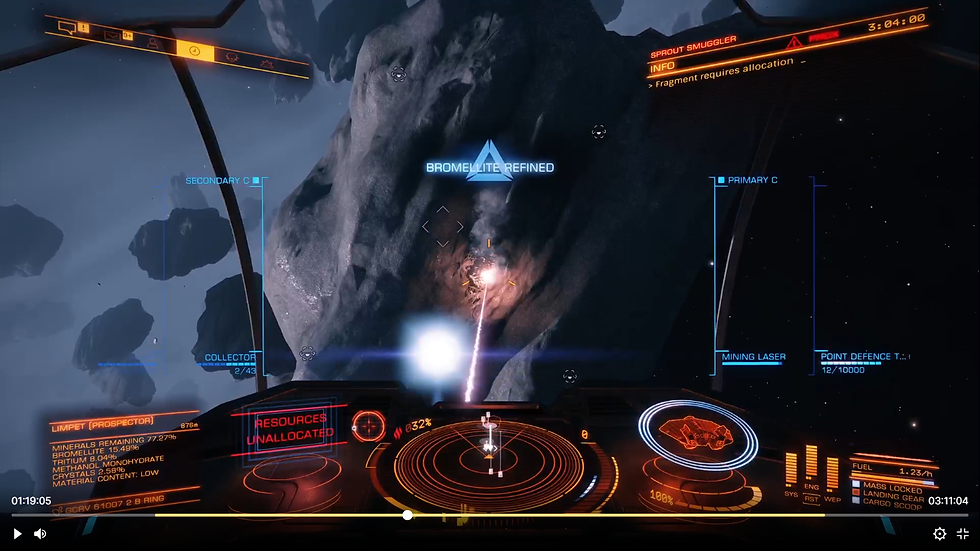
The mining laser is the simplest mining method and is ideal for beginners or ships not fully dedicated to mining.
The mining laser is equipped in a hardpoint just like a standard weapon. Not all stations stock them, so you may need to visit an industrial or extraction system.
To use it:
Open your cargo hatch
Deploy a collector limpet
Fire the mining laser at the asteroid
Chunks will break off and be collected automatically. This is one of the easiest and most reliable mining methods in the game. Once your cargo is full, return to a station and sell your materials — just be cautious of pirates scanning you while carrying valuable cargo.
Displacement Missiles (Subsurface Mining)

Displacement missiles are used to mine subsurface deposits.
After identifying subsurface deposits with a prospector limpet, you’ll see an x-ray-style indicator showing where the material is embedded inside the asteroid.
To use displacement missiles:
Equip them in a hardpoint
Aim at the subsurface deposit
Hold down the fire button (a quick press will not work)
A drilling graphic appears on the left side of the screen. You must time the release so it aligns with the blue bars, which represents the optimal extraction zone.
This part is not well explained in-game, but holding the trigger is essential for it to function properly.
Abrasion Blaster
The abrasion blaster is used to remove surface deposits.
Simply aim at the material attached to the surface of the asteroid and fire. The fragments will break off and can be collected by your limpets.
Collector Limpet tip: Although it seems logical to target individual fragments before launching a collector limpet, it’s actually better to launch the limpet with nothing targeted. This allows it to collect multiple items without expiring after one pickup.
Seismic Charges (Core Mining)

Seismic charges are used to crack open asteroids and access the most valuable core materials.
Some of these materials can be worth 100,000–200,000 credits each, making core mining extremely profitable.
Once your prospector limpet confirms the presence of fissures:
Select your seismic charges
Attach charges to the asteroid by firing them at fissures
Hold the trigger to bury the charge slightly deeper
You’ll see a yield graph appear in the top-right of the screen as charges are placed. Your goal is to land within the blue zone.
Too few charges = asteroid won’t crack
Too many charges = asteroid over-explodes and you lose resources
Around three well-placed charges is usually ideal. Avoid pushing the yield into the red zone.
Once set, detonate the charges and collect the exposed materials.
You will need either the abrasion blaster or displacement missiles here, depending on whether they are surface or subsurface deposits.
Video Tutorials for Core Mining
For a more detailed look at core mining, including how to use each of the tools described here, check out the full video tutorials for Core Mining on Elite Dangerous on our YT channel.
If you have any questions or any aspect of mining you are struggling with on Elite Dangerous, just give us a shout. Lot of people beating themselves up about this, getting down about not being able to mine effectively or understand the system.
Don't worry though, everyone experiences this and the game is not explained very well. We have to help each other and share our knowledge. Even after playing the game for several years you can still learn new things. The game is massive so don't be afraid to ask about anything you don't quite understand yet.
Elite Dangerous on PC features on-foot combat and immersive story line - bringing it back to the console
As part of our campaign for console players on Elite Dangerous, at Sprout Land we are looking to bring back the story line elements and even hopefully the Odyssey DLC - featuring on-foot combat and the ability to leave your ship and walk around.
More updates coming soon on this but you can check out the PC version of Elite Dangerous here:


Scan the QR Code for full details or follow the affiliate link:
Elite Dangerous Full Game on Steam at Yuplay UK (only £3.79)


Comments